Best AI Flashcard Apps in 2026: What Actually Matters
AI flashcard apps ranked by what actually improves retention: card quality, FSRS scheduling, and sustainable daily review — not just generation speed.
TL;DR — Our Verdict
Deckbase is the best AI flashcard app and AI flashcard generator for most students in 2026. It is the only tool that combines built-in AI card generation, FSRS spaced repetition scheduling, and full cross-platform sync (iOS, Android, web) with a free tier. Anki remains the gold standard for customization but requires manual setup and add-ons for AI generation. Quizlet is best for quick test prep but lacks adaptive spaced repetition.
By Deckbase Team · Last updated: June 27, 2026
The best AI flashcard app in 2026 is not the one that generates cards fastest. It is the one that produces cards accurate enough to review, schedules them at the right intervals, and fits into a sustainable daily habit.
AI generation has become table stakes — nearly every major flashcard app now offers some form of it. What separates the good apps from the mediocre ones is what happens after the cards are created: how well the scheduling algorithm retains material over time, and how low-friction the daily review experience is.
This guide ranks the top AI flashcard apps by what actually matters for retention.
How to Choose an AI Flashcard App: 5 Criteria That Matter
Before comparing apps, here is the framework that matters:
-
Generation quality — Does the AI produce one-concept-per-card prompts, or multi-question noise?
-
Scheduling algorithm — Does it use FSRS or SM-2? FSRS is significantly more accurate for long intervals.
-
Review experience — Is the mobile app fast and low-friction enough for a 10-minute daily session?
-
Source flexibility — Can you feed it PDFs, text, notes, and URLs — or only typed input?
-
Edit workflow — Can you quickly fix bad AI-generated cards before they enter review?
Best AI Flashcard Apps by Use Case (Quick Picks)
- Best overall (AI + FSRS + mobile): Deckbase(opens in a new tab)
- Best for add-on power users: Anki + AnkiConnect or AI add-ons
- Best for note-taking integration: RemNote
- Best for language learning: Clozemaster + Anki
- Best free option: Deckbase free tier
Comparison Table: All Apps at a Glance
| App | Best For | AI Generation | Scheduler | Free Tier |
|---|---|---|---|---|
| Deckbase(opens in a new tab) | Overall | Built-in | FSRS | Yes |
| Anki | Power users | Add-ons only | FSRS / SM-2 | Yes (desktop) |
| RemNote | Note-taking | Built-in (Pro) | SM-2 variant | Limited |
| Quizlet | Quick prep | Built-in (Plus) | Basic | With ads |
| Brainscape | CBR users | No | CBR | Limited |
- Best For
- Overall
- AI Generation
- Built-in
- Scheduler
- FSRS
- Free Tier
- Yes
Anki
- Best For
- Power users
- AI Generation
- Add-ons only
- Scheduler
- FSRS / SM-2
- Free Tier
- Yes (desktop)
RemNote
- Best For
- Note-taking
- AI Generation
- Built-in (Pro)
- Scheduler
- SM-2 variant
- Free Tier
- Limited
Quizlet
- Best For
- Quick prep
- AI Generation
- Built-in (Plus)
- Scheduler
- Basic
- Free Tier
- With ads
Brainscape
- Best For
- CBR users
- AI Generation
- No
- Scheduler
- CBR
- Free Tier
- Limited
1. Deckbase: Best Overall AI Flashcard App
Deckbase(opens in a new tab) is the only app on this list where AI generation, FSRS scheduling, and cross-platform review are all built-in with no setup required.
AI flashcard generator: Paste notes, text, or upload a PDF and Deckbase drafts cards automatically. The output quality is high because the AI is tuned for one-concept-per-card format — the standard that maximizes retention in spaced repetition. It works especially well as a notes to flashcards converter: paste lecture outlines, textbook highlights, or study summaries and get review-ready cards in seconds.
Scheduling: FSRS is the default scheduler. You do not need to configure anything to get adaptive interval scheduling from day one.
Review experience: Web, iOS, and Android apps with full sync. The mobile review interface is designed for short, focused sessions.
Pricing: Free tier covers core review and card creation. Pro plan adds unlimited AI generation and advanced deck features.
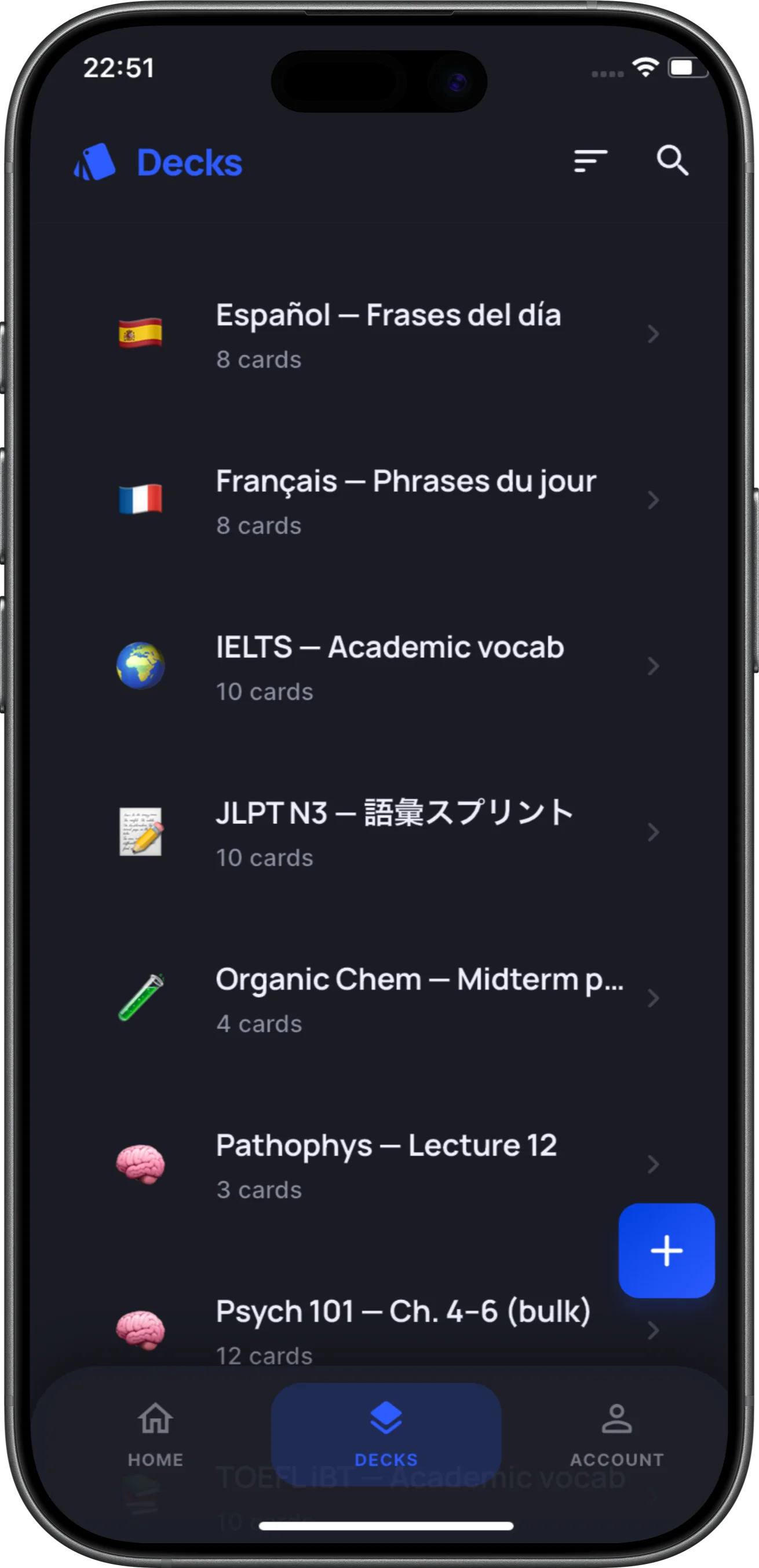
AI generation from notes or PDF
→ Deckbase AI flashcard generator(opens in a new tab)
2. Anki: Best for Power Users (With Setup Guide)
Anki does not have built-in AI generation, but with the right add-ons it becomes a powerful AI flashcard system. AnkiConnect (the REST API bridge) lets you build custom pipelines from any source. Third-party add-ons like AnkiGPT can generate cards from text directly within Anki.
AI generation: Requires add-on setup. The quality depends on the add-on you choose and how you prompt it.
Scheduling: FSRS since version 23.10 — enable it per deck in settings. SM-2 was the previous default.
Review experience: Desktop and AnkiDroid are free. AnkiMobile (iOS) is $29.99.
Best for: Users who want maximum control and are comfortable setting up tooling. Not recommended as a starting point for AI card creation.
→ Anki alternatives comparison(opens in a new tab)
3. RemNote: Best for Note-Taking + Flashcards
RemNote’s AI can generate flashcards from notes you take within the app. If your study workflow involves active note-taking before review, RemNote eliminates the step of exporting to a separate flashcard app.
AI generation: Built-in on paid plans. Works from notes in the RemNote editor.
Scheduling: SM-2 variant — not FSRS. For learners focused on maximizing long-interval retention, this is a meaningful gap.
Review experience: Good for desktop users; mobile is improving but less polished than Deckbase.
Pricing: Pro is $8/mo or $72/yr. Free tier is limited.
4. Quizlet: Best for Quick Test Prep (Not Long-Term)
Quizlet added AI generation in 2023 and it works reasonably well for creating card sets quickly. The core limitation is not the AI — it is the review engine. Quizlet’s Learn mode does not use adaptive spaced repetition, so material decays without well-timed re-exposure.
If you are using Quizlet AI for short-term test prep, it is fine. For long-term retention, you will outgrow it quickly.
→ Best Quizlet alternatives(opens in a new tab)
5. Notion + Anki/Deckbase: Best for Notion Users
Some learners use Notion AI to generate card drafts from their notes, then export to CSV and import into Anki or Deckbase. This is a valid workflow but adds manual steps. It works best for learners already using Notion as their knowledge base.
Tradeoff: More friction than native AI apps, but full control over AI prompts and card formatting.
The 1-Week Flashcard App Test (Before You Commit)
Run this 1-week test before choosing your primary tool:
-
Take one real study topic you need to learn
-
Generate 20–30 cards from your actual source material (not a sample doc)
-
Review the output quality: one concept per card? Clear answers? No duplicates?
-
Complete daily review for 7 days and track your completion rate
-
Decide based on completion rate, not feature list
An app you actually review every day beats an app with better features you open twice a week.
YouTube to Flashcards
A growing number of students learn from video lectures, tutorials, and documentaries. The gap is retention: passively watching a 45-minute biology lecture on YouTube does not produce durable memory. Converting that video content into flashcards closes the loop.
How it works: Paste a transcript (or a summary of the video) into an AI flashcard generator. The AI extracts key concepts, definitions, and causal relationships and turns them into one-concept-per-card prompts. Some tools also accept the video URL directly and parse the auto-generated captions.
Best workflow:
- Watch the video once without pausing for notes.
- Skim the transcript and highlight 5–10 key concepts.
- Feed those concepts into Deckbase or an AI prompt.
- Review the cards within 24 hours while the video is still fresh in memory.
Why it matters for long-tail SEO: "YouTube to flashcards" and "video lecture to flashcards" are underserved queries. Students searching for this are usually mid-funnel — they already use flashcards and are looking for a faster creation pipeline.
Image OCR & Handwritten Note Scanning
Not all study material starts as typed text. Many students take handwritten notes in class, annotate printed slides, or photograph whiteboards. Image OCR (optical character recognition) lets you convert those images into text and then into flashcards without retyping.
What to look for:
- Handwriting recognition accuracy: Modern OCR handles printed text well, but cursive handwriting still varies by tool. Test with your own notes before committing.
- Multi-image uploads: Can you upload 10 pages of notes at once, or only one image at a time?
- Math and symbol support: STEM students need tools that recognize equations, chemical structures, and Greek letters.
Current state: Deckbase accepts image uploads as source material and extracts text for card generation. Anki users can pair apps like Mathpix (for equations) or Google Lens (for general text) with AnkiConnect to automate the import. RemNote does not yet offer native OCR-to-flashcard conversion.
Best for: Students who prefer handwriting notes but want the scheduling power of a digital flashcard app.
Flashcard Strategies by Subject
One-concept-per-card is the universal rule, but the type of concept varies by subject. Here is how to format cards for four major domains.
Sciences (Biology, Chemistry, Physics)
- Biology: Use image occlusion for diagrams. Label a cell diagram, then turn each label into a separate card asking "What structure performs X function?"
- Chemistry: Mechanism cards. Show a reaction step and ask what intermediate forms. Keep reagents on the front and mechanisms on the back.
- Physics: Formula cards should include derivation context, not just the equation. Ask "Under what condition does F = ma simplify to constant acceleration?" rather than "What is Newton's second law?"
Humanities (History, Literature)
- History: Causation cards beat date cards. Instead of "When did X happen?" ask "What caused X, and what was the immediate effect?"
- Literature: Comparison cards work well. "How does Theme X in Novel A differ from Theme X in Novel B?" forces higher-order thinking than simple recall.
Languages
- Vocabulary: Use sentence-level context, not isolated words. "He displayed remarkable ______ (fortitude) under pressure."
- Grammar: Pattern recognition cards. Show three correct examples and one incorrect example, then ask which violates the rule and why.
- Pronunciation: If your app supports audio, record yourself or use text-to-speech for the target language on the front of the card.
Math & Quantitative Subjects
- Problem-type recognition: The most common mistake is memorizing a solution without recognizing when to apply it. Cards should ask "What technique applies here?" before showing the solution.
- Proof steps: Break proofs into logical jumps. Each card asks for the next justification, not the full proof.
ChatGPT Prompts for Flashcard Creation
If your flashcard app does not have built-in AI generation, you can use ChatGPT (or Claude, Gemini) as a preprocessing step. The quality of the output depends entirely on the prompt. Here are two battle-tested templates.
Prompt 1 — Text-to-Cards (General Study)
You are a flashcard creator. Convert the following text into flashcards using a one-concept-per-card rule.

Rules:
- Each card tests exactly one fact, definition, or relationship.
- Front: a clear question or fill-in-the-blank prompt.
- Back: a concise answer (1–2 sentences max).
- Do not combine multiple questions into one card.
- If a concept has multiple sub-concepts, split them into separate cards.

Text:
[Paste your notes here]
Prompt 2 — PDF/Notes-to-Cards (Medical or Dense Material)
You are a medical education flashcard creator. Convert the following notes into Anki-style cards.

Rules:
- Use cloze deletion (fill-in-the-blank) for definitions and lists.
- Use question-answer format for causal relationships.
- Keep each card under 30 words total.
- Flag any ambiguous information with [VERIFY].

Notes:
[Paste your notes here]
Why these work: The one-concept-per-card constraint prevents the AI from generating multi-question noise. The word-count limit forces concision. The [VERIFY] tag catches hallucinations before they enter your review queue.
Medical Student Recommendations
Medical students represent one of the highest-volume flashcard user groups. The material is dense, the timelines are fixed, and retention directly impacts exam performance. Here is what matters for this niche.
Why Anki dominates med school: The AnKing deck is a community-maintained, comprehensive resource that covers most USMLE Step 1 and Step 2 material. If you need a pre-made deck, Anki is currently the only viable option.
Where AI apps fit:
- Custom school lectures: Your professor's slides are not in AnKing. An AI flashcard app can generate cards from those slides faster than manual typing.
- Image-heavy material: Dermatology, radiology, and histology require high-quality image cards. Apps with strong image support (or the ability to generate image occlusion) save hours.
- Scheduling accuracy: Medical school spans years. A scheduler that gets long intervals right (FSRS) matters more than one optimized for short-term cramming.
Recommended workflow: Use AnKing for established topics, and use an AI generator for school-specific lectures and image-heavy custom material. Export the AI-generated cards to Anki if you want a single review queue, or review them in the native app if the scheduler is FSRS.
The Science Behind Spaced Repetition
AI flashcard apps generate cards quickly, but generation speed does not determine retention. The scheduler does. Understanding the science helps you evaluate whether an app will actually work.
The spacing effect: In 1885, Hermann Ebbinghaus published the first rigorous study of forgetting (Wikipedia: Forgetting curve(opens in a new tab)). He found that memory decays exponentially after learning, but that decay slows each time the memory is reactivated at the optimal interval. This became the spacing effect — the foundational principle behind all spaced repetition software.
Active recall vs. recognition: Rereading notes creates a sense of familiarity, not memory. Flashcards force active recall: you must generate the answer from scratch. Research by Karpicke and Roediger on retrieval practice consistently shows that actively recalling information produces significantly better long-term retention than passively restudying the same material (Wikipedia: Active recall(opens in a new tab)).
Why FSRS matters: SM-2, the older standard, uses fixed multipliers for intervals. FSRS (Free Spaced Repetition Scheduler) models forgetting as a continuous function and adapts intervals based on your actual performance history. For intervals beyond 6 months, FSRS is measurably more accurate than SM-2. The algorithm is open-source and maintained by the Open Spaced Repetition community.
The implication for AI apps: An app that generates 500 cards in 10 seconds but buries half of them under a weak scheduler will produce worse outcomes than an app that generates 50 cards with optimal scheduling. Speed is a feature. Scheduling is the product.
Common Flashcard Mistakes & Weekly Routine
Even the best app fails if the user creates bad cards or skips reviews. Here are the most common errors and a simple routine to avoid them.
Top 5 mistakes:
- Orphan cards: A card with no context. "What is 42?" is meaningless. Always include the topic domain: "In the context of [Topic], what does 42 represent?"
- Multi-concept cards: "What are the causes, symptoms, and treatments of X?" Split these into three separate cards.
- Dishonest grading: Marking a card "Easy" when you barely guessed it. The scheduler depends on honest feedback. If you struggled, mark it "Hard" or "Again."
- Too many new cards: Adding 100 new cards in one session creates an unmanageable review backlog. Limit new cards to 15–20 per day.
- Never editing: Bad cards accumulate. Spend 5 minutes each Sunday deleting or rewriting cards that you consistently fail.
A sustainable weekly routine:
- Monday–Saturday: Complete your daily review queue. Do not add new cards on days you are behind.
- Sunday: Audit session. Review your worst-performing cards (usually the ones you marked "Hard" or "Again" most often). Rewrite or delete them. Add new cards for the upcoming week, capped at 20 per day.
This routine takes 10–15 minutes daily and prevents the two most common failure modes: backlog abandonment and card quality decay.
Frequently Asked Questions About AI Flashcard Apps
What is the best AI flashcard generator for studying?
Deckbase(opens in a new tab) is the strongest combination of AI generation quality and FSRS scheduling for long-term retention. Anki with add-ons is the best option for power users who want full control.
Can AI flashcard apps generate cards from PDFs?
Yes — Deckbase supports PDF input natively and works as a PDF to flashcards(opens in a new tab) converter. Anki requires add-ons for PDF-to-card generation.
Can I convert notes to flashcards with AI?
Yes. Deckbase acts as a notes to flashcards(opens in a new tab) converter: paste lecture outlines, textbook highlights, or study summaries and AI generates one-concept-per-card drafts. You edit before review.
Are AI-generated flashcards accurate enough to study from?
Treat AI output as a first draft. Review each card before it enters your long-term review queue. The main quality issues to fix: multi-concept cards (split them), ambiguous prompts (rewrite them), and duplicate cards (delete them).
Does the spaced repetition algorithm matter if cards are AI-generated?
Yes — arguably more so. AI generation makes it easy to add hundreds of cards quickly. A weak scheduler will bury important material or over-review easy material. FSRS is the current standard for getting intervals right. Read the FSRS guide(opens in a new tab).
What is the best free AI flashcard app?
Deckbase’s free tier covers AI card creation and FSRS review with no upfront cost. Anki is free on desktop with AI available through add-ons.
Related Guides
- PDF to Flashcards(opens in a new tab)
- Notes to Flashcards(opens in a new tab)
- Anki Import Guides(opens in a new tab)
- Easy Anki Alternative(opens in a new tab)
- FSRS Spaced Repetition Guide(opens in a new tab)
- Best Anki Alternatives for 2026(opens in a new tab)
- Best Quizlet Alternatives for 2026(opens in a new tab)
- Best Flashcard Apps — Full Ranking(opens in a new tab)
Turn articles like this into flashcards
Paste a link, PDF or notes — Deckbase builds the deck and schedules reviews with FSRS.